
Reconnect.
Collaborate.
Grow.
A dedicated community for PDLG alumni to strengthen professional ties and build a stronger network.
Reconnect.
Collaborate.
Grow.
A dedicated community for PDLG alumni to strengthen professional ties and build a stronger network.
Untapped Potential
Find your connections with 750+ alumni who have attended PDLG programming.
Central Hub
One platform to strengthen professional relationships.
Mission Aligned
Supporting the participation and success of lawyers and their life experiences.
Designed for You
Professional Profiles
-
Build your comprehensive legal profile
-
Showcase expertise and career highlights
-
Update your milestones and achievements
Smart Search & Connect
-
Search by practice area, law school, or city
-
Filter by graduation year and specialties
-
Message alumni securely within the platform
-
Control privacy and visibility
Why Not Just Use LinkedIn?
PDLG’s Alumni Directory is your private, professional space — built for connection, mentorship, and opportunity.
| Feature | PDLG Alumni Directory | |
|---|---|---|
| Exclusively for PDLG alumni | ✅ | ❌ |
| Private and secure community | ✅ | ❌ |
| Built-in mentorship opportunities | ✅ | ❌ |
| Personalized event invitations | ✅ | ❌ |
A Community That Grows With You
Join 750+ alumni building meaningful professional relationships and giving back to the next generation of PDLG Fellows.
1. Stronger Network – Reconnect and collaborate
2. Enhanced Programs – Mentorship, hiring, and events
3. Mission Amplified – Extend PDLG’s reach and impact
Join the PDLG Alumni Directory
Reconnect with peers, expand your network, and continue making an impact in the legal community.
Frequently Asked Questions
We know you have questions, find the answers here.
To edit your profile, first sign in to your PDLG account on pdlg.net. Once logged in, navigate to your profile page or account settings (look for your name or a profile icon in the menu). On your profile page, you will see an option to edit your information. Click Edit Profile, and you can update fields such as your contact information, firm/employer, practice area (field of law), city, bio, or upload a new photo. After making changes, be sure to Save your profile by clicking the button at the bottom of the page. Your changes will appear immediately. If you have any issues editing your profile, you can contact the site administrator for help.
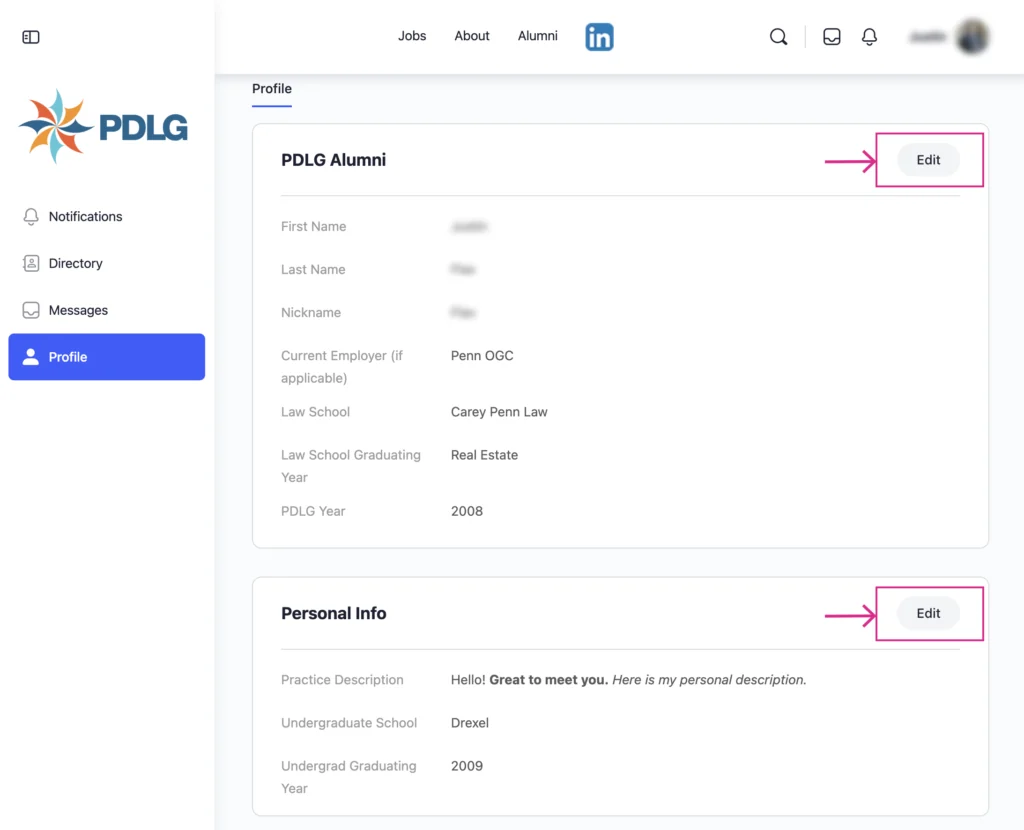
A: PDLG gives you control over your directory visibility. In your profile settings, there are privacy options for each piece of information you share. You can choose to make certain fields visible to Everyone (Public), Only logged-in PDLG members and affiliates (All Members), only people you are connected to inside the directory (My Connections), or Only you (Private). By default, basic details like your name, class year, and practice area may be visible to other alumni, but you can adjust these settings anytime. For example, you might allow fellow alumni to see your work history but keep your personal email and photo private. Simply select how the visibility option from the dropdown menue next to each profile field, or use the toggle if provided to hide your entire profile from the directory. These changes take effect immediately, so you are in charge of who sees what.
Remember, you have the option to limit visibility, for instance, you can set your profile or certain fields to All Members/My Connections (Only PDLG members and affiliates) or Only Me (Private), in which case non-members or the public cannot see those details.
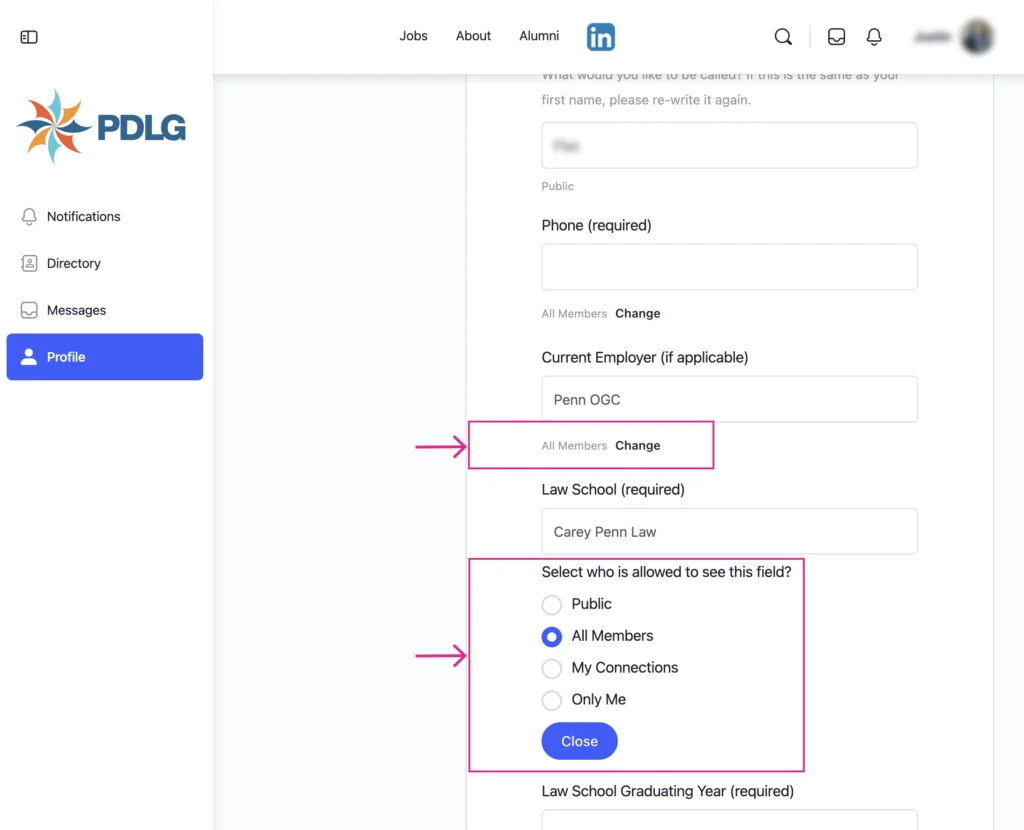
A: The audience for your information depends on your privacy settings. By default, the alumni directory is viewable by PDLG members who are logged in to the site, so other verified alumni and program participants can see directory listings. Some basic profile listings (such as your name and current role or practice area) might also be visible to the general public visiting the site, but detailed information (like contact info) is restricted. If you have not changed your settings, other PDLG alumni can likely see your name, graduation year, practice area, and employer, which helps classmates and colleagues recognize you. Remember, you have the option to limit visibility, for instance, you can set your profile or certain fields to All Members/My Connections (Only PDLG members and affiliates) or Only Me (Private), in which case non-members or the public cannot see those details.
A: By default, we populate the alumni directory with some you name. The publicly visible fields typically include your first name, last name, and nickname. Sensitive information like your personal email, phone number, alma mater is not public by default. Those are either hidden or only visible to logged-in members (and you can hide them entirely if you want). In summary, the default is to show only non-sensitive, professional info to help connect alumni, and anything beyond that is up to your preferences.
A: The alumni directory is primarily intended for the PDLG community, not for broad public search. Basic directory pages may be discoverable on the web, which means search engines could index summary information (for example, your name appearing on a public alumni list). However, detailed profile information is behind the login and not exposed to search engine crawlers. If you have concerns about privacy and search visibility, we recommend setting your profile to members-only or private. A private profile or hidden fields will not show up on public pages, so search engines should not index that content. We also employ standard measures (like instructing search engines not to index certain directory pages) to protect members’ privacy. In short, if you prefer not to be searchable online via our directory, use the privacy controls to limit public visibility, and your information will remain within the PDLG community only.
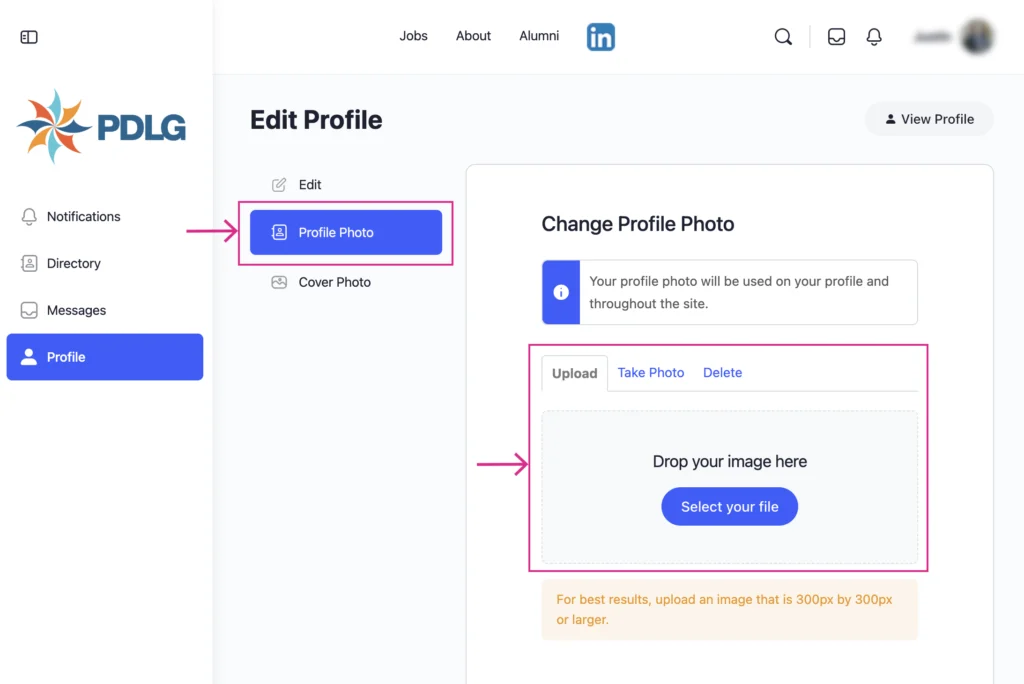
A: Uploading a profile photo can help personalize your directory entry. To add or change your photo, log in and go to your Edit Profile page. There should be an option to upload a photo (often a button labeled “Add Photo” or an edit icon on the existing photo avatar). Click that and choose an image file from your device. We suggest a professional-looking headshot, as this is a professional alumni network. After selecting your image, you may be able to crop or adjust it, then save. Once saved, your profile picture will appear on your profile and next to your name in the directory (visible based on your privacy settings). If you ever want to update it, just repeat the process with a new image. And if you prefer not to have a photo, you can remove it or leave it blank – that’s completely fine.
A: If you decide you do not want to be listed in the alumni directory at all, you have a couple of options. The quickest way is to adjust your profile visibility settings to hidden/private, which effectively removes your profile from the public directory listings. Other alumni will no longer see you in search results once you’ve hidden your profile. If you want to take it a step further, you can contact PDLG and request that your profile be removed or your account deleted. As a non-profit membership site, we handle deletions manually for security – simply send us a message stating that you’d like to be removed from the directory. We will then deactivate or delete your account information as requested. Keep in mind that removal is reversible only if you sign up again or ask us to restore your profile – so if it’s a temporary privacy need, using the privacy toggle might be a better immediate solution. We’re here to respect your choices: whether you want to be very visible or completely off-list, you can do that easily with the tools provided or with our help.
A: No, the alumni directory is an optional resource. It’s there to help PDLG alumni stay connected, but it’s not mandatory to use. When you create an account, you can decide how much information (if any) you want to share in the directory. If you opt not to participate, you can keep your profile minimal or private. PDLG will still keep your information on file for organizational purposes (for example, to send you newsletters or updates if you subscribed), but you won’t appear in the public or member-facing directory. We encourage alumni to participate because it can be valuable for networking and community building, but we completely understand if someone chooses not to. You will not lose any other benefits of PDLG membership by staying out of the directory, it’s your choice.
A: If you need assistance with the alumni directory – whether it’s editing your profile, trouble logging in, or a privacy concern – you can reach out to us for support. We’re a small team, but we strive to respond promptly to our members. We can help with technical problems, guide you through the profile settings, or address any concerns about how your information is being displayed. Additionally, if you notice any misuse of the directory or have suggestions for improvements, please let us know. The directory is for you, the alumni, and we want to ensure it’s helpful, secure, and easy to use for everyone.